Virtualisation, Storage and various other ramblings.

Month: December 2017

Homelab Networking Refresh

Adios, Netgear router

In hindsight, I shouldn’t have bought a Netgear D7000 router. The reviews were good but after about 6 months of ownership, it decided to exhibit some pretty awful symptoms. One of which was completely and indiscriminately drop all wireless clients regardless of device type, range, band or frequency it resided on. A reconnect to the wireless network would prompt the passphrase again, weirdly. Even after putting in the passphrase (again) it wouldn’t connect. The only way to rectify this was to physically reboot the router.

Netgear support was pretty poor too. The support representative wanted me to downgrade firmware versions just to “see if it helps” despite confirming that this issue is not known in any of the published firmware versions.

Netgear support also suggested I changed the 2.4ghz network band. Simply put. They weren’t listening or couldn’t comprehend what I was saying.

Anyway, rant over. Amazon refunded me the £130 for the Netgear router after me explaining the situation about Netgear’s poor support. Amazing service really.

Hola, Ubiquiti

I’ve been eyeing up Ubiquiti for a while now but never had a reason to get any of their kit until now.  With me predominantly working from home when I’m not on the road and my other half running a business from home, stable connectivity is pretty important to both of us.

The EdgeMAX range from Ubiquiti looked like it fit the bill. I’d say it sits above the consumer-level stuff from the likes of Netgear, Asus, TP-Link etc and just below enterprise level kit from the likes of Juniper, Cisco, etc. Apart from the usual array of features found on devices of this type I particularly wanted to mess around with BGP/OSPF from my homelab when creating networks in VMware NSX.

With that in mind, I cracked open Visio and started diagramming, eventually ending up with the following:
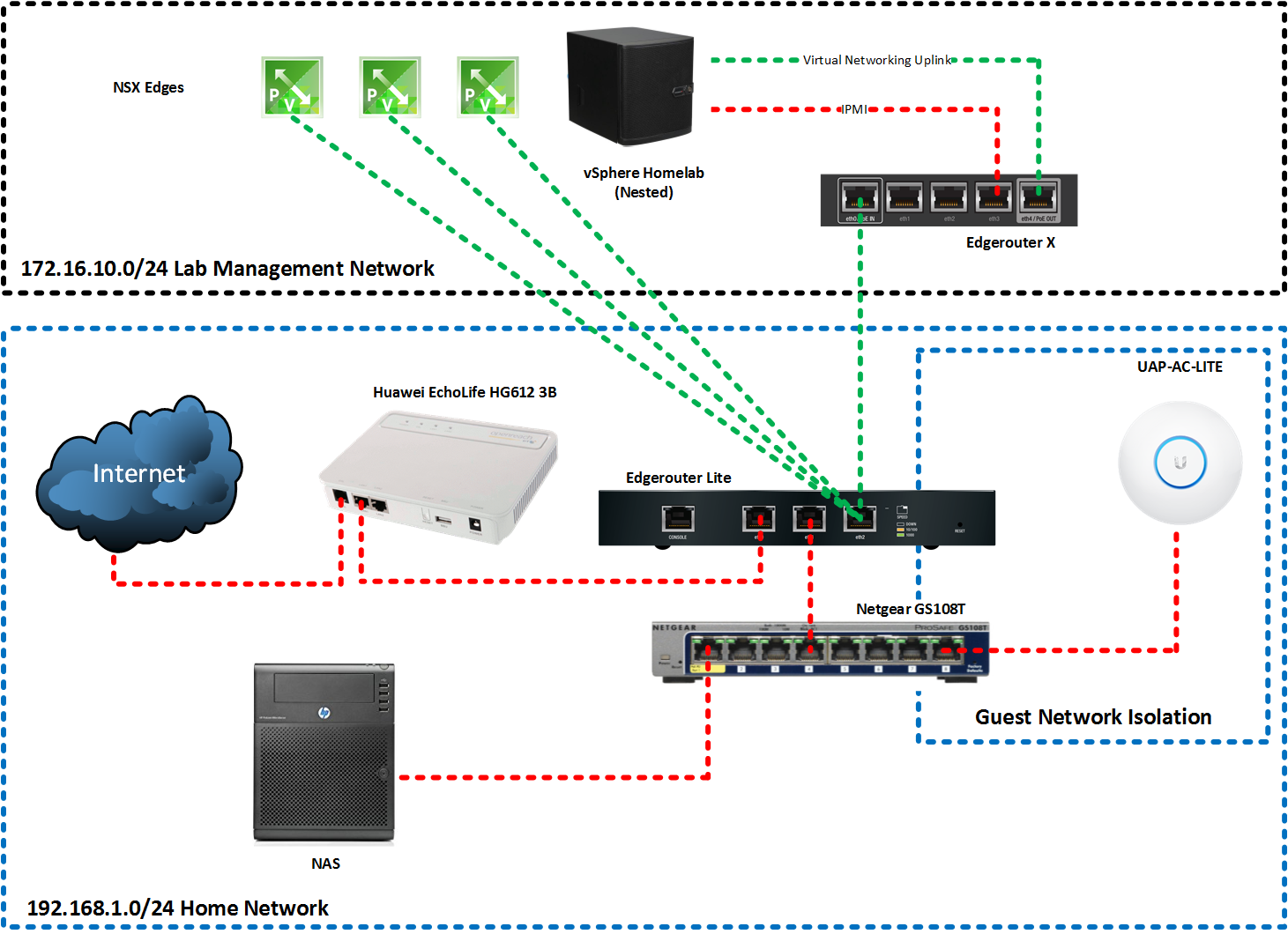
 

I noted the following observations:

  • Ubiquti Edgerouters do not have a build in VDSL modem, therefore for connections such as mine, I required a separate modem.
  • The Edgerouter Lite has no hardware switching module, therefore it should be purely used as a router (makes sense)
  • The Edgerouter X has a hardware switching module with routing capabilities (but lower total pps (Packets Per Second))

Verdict

I managed to set up the pictured environment over the weekend fairly easily. The Ubiquiti software is very modern, slick, easy to use and responsive. Leaps and bounds from what I’ve found on consumer-grade equipment.

I have but one criticism with the Ubiquiti routers, and that is not everything is easily configurable through the UI (yet). From what I’ve read Ubiquiti are making good progress with this, but for me I had to resort to the CLI to finish my OSPF peering configuration.

The wireless access point is decent. good coverage and the ability to provision an isolated guest network with custom portal is a very nice touch.

Considering the Edgerouter Lite costs about £80 I personally think it represents good value for money considering the feature set it provides. I wouldn’t recommend it for every day casual network users, but then again, that isn’t Ubiquiti’s market.

The Ubiquiti community is active and very helpful as well.


Embracing the SDDC with NSX-V automation

The Software Defined Data Center (SDDC for short) has become a widely adopted and embraced model for modern datacentre implementations. Conveying the benefits of the SDDC, particularly the non-technical aspects can be a challenge. In this blog post we take a practical example of a single activity we can automate in NSX and the benefits that come from it, both technical and non-technical.

The NSX API

An API (Application Programming Interface), in simple terms is an intermediary that allows two applications to communicate with each other via a common syntax. Although we may not be aware of it, it’s likely we use API’s every day when we use applications such as Facebook, LinkedIn, vSphere and countless others. For example, when you create a logical switch in the vSphere web client, behind the scenes an API call is made to the NSX manager to facilitate that request.

The NSX API is based on REST which leverages HTTPS requests to GET, PUT, POST and DELETE data from the NSX ecosystem:

  • GET – Retrieve an entity
  • PUT – Create an entity
  • POST – Update an entity
  • DELETE – Remove an entity

An entity can be a variety of NSX objects such as Logical Switches, Distributed Routers, Edge Gateways, Firewall rules, etc.


Options for working with the NSX API

Several avenues exist for working with the rest API, each having their own advantages and disadvantages:

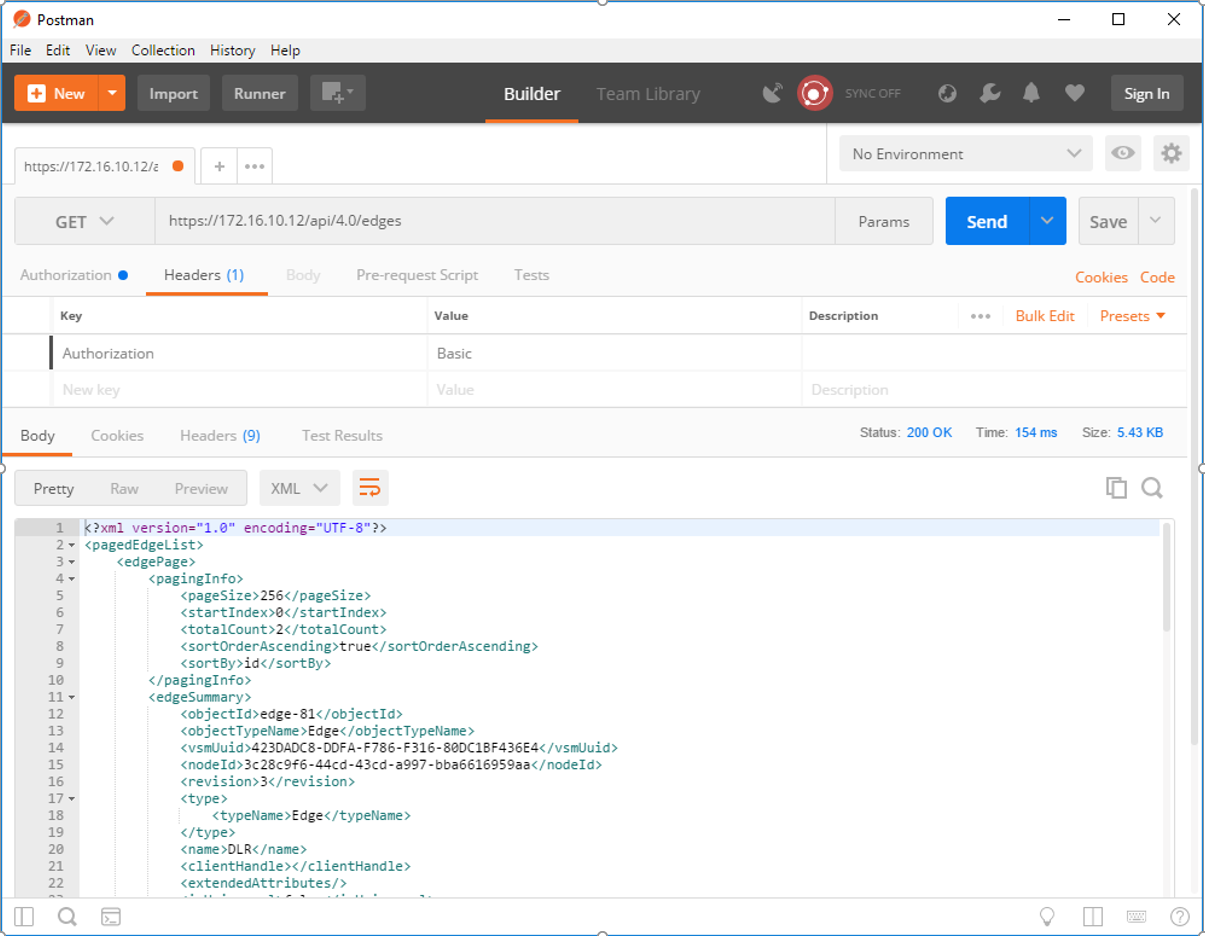
  • Direct API calls via REST client – These can be made via clients such as Postman. These calls are static and are therefore suitable for one-off requests.


  • PowerNSX – PowerNSX is a PowerShell module that enables the consumption of API calls via Powershell cmdlets. It’s an open source community project but is not supported by VMware. Also, not all API calls are currently exposed as cmdlets.
  • API calls via code – API calls can be made from a variety of programming libraries (Powershell, C#, Java, etc) which add functionality by adding an element of dynamic input. We use this as an example in this blog.


Practical example – Creating new networks in a legacy virtualised compute environment

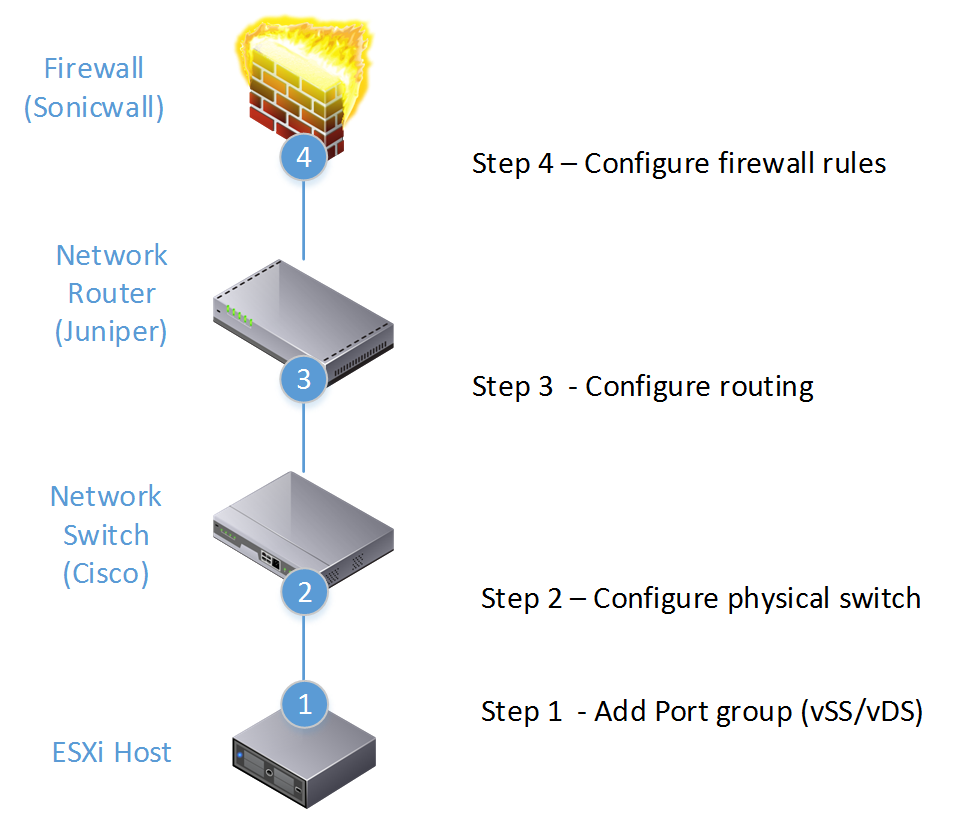
To illustrate the power of automating NSX via automation let’s take an example activity and break it down into respective tasks. In this example, we want to create an N-tier network (IE a network comprising of Web, App and DB tiers which are routable and sit behind a perimeter firewall).


Depending on factors such as the number of vendors used and the structure of the IT team, we can see that executing a relatively simple task of creating an N-Tier routable, secure network for the purposes of consumption could:

  • Involve multiple network teams (vSphere admin/network admin/security admin)
  • Involve multiple tools (in this example tools from vSphere, Cisco, Juniper and Sonicwall)

This operational complexity can hinder the speed and agility of a business due to factors such as:

  • Multiple teams need to collaborate. Collaboration between vSphere / Network / Security teams can be time-consuming
  • Multiple tools/skillsets required. In the example above skills pertaining to Sonicwall, Juniper, Cisco and vSphere are required to create a secure network topology


Practical example – Automating in NSX

To demonstrate the automation capabilities designed to address the example a Powershell script was created to facilitate API calls directly to NSX. The advantage of doing this is:

  • API calls are supported by VMware.
  • The entire API ecosystem is exposed for consumption.
  • Powershell can prompt the user for information, which is then used to dynamically populate API requests.
  • All tiers of the network are created and managed by a single management plane.


This script starts with the layer 2 logical switches and then moves up the networking stack configuring the layer 3 and perimeter elements of this network:


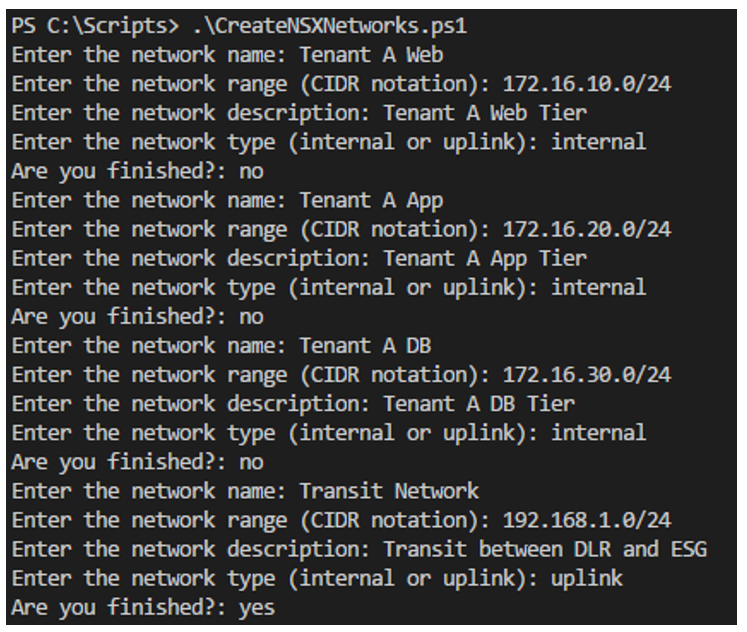
For each logical network we prompt the user for the following:

  • Name – What we want to call the logical network
  • Network Range – The intended network range for this network. This is used to determine the DLR’s interface on it
  • Network Description – What we provide as the description
  • Network Type – Simply put, Uplinks are used for peering (North/South) traffic. We need one uplink network to facilitate the peering between the DLR and ESG


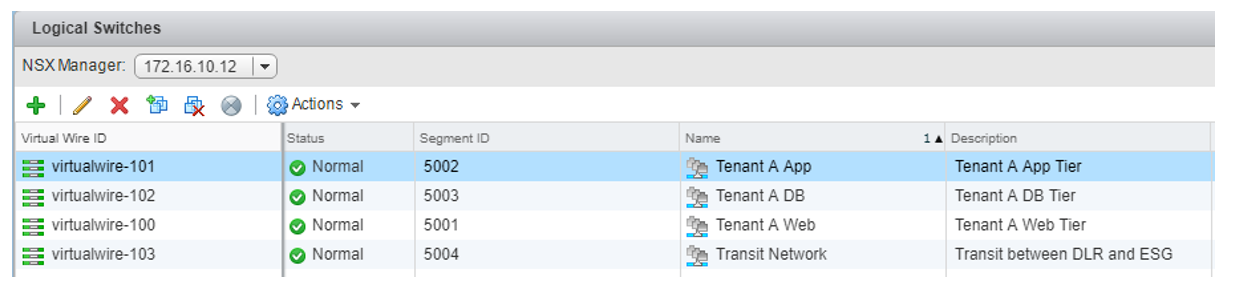
Once the user has put in the required networks, API calls are executed from the Powershell script to create the networks:

Next is to prompt the user for the DLR and ESG names:


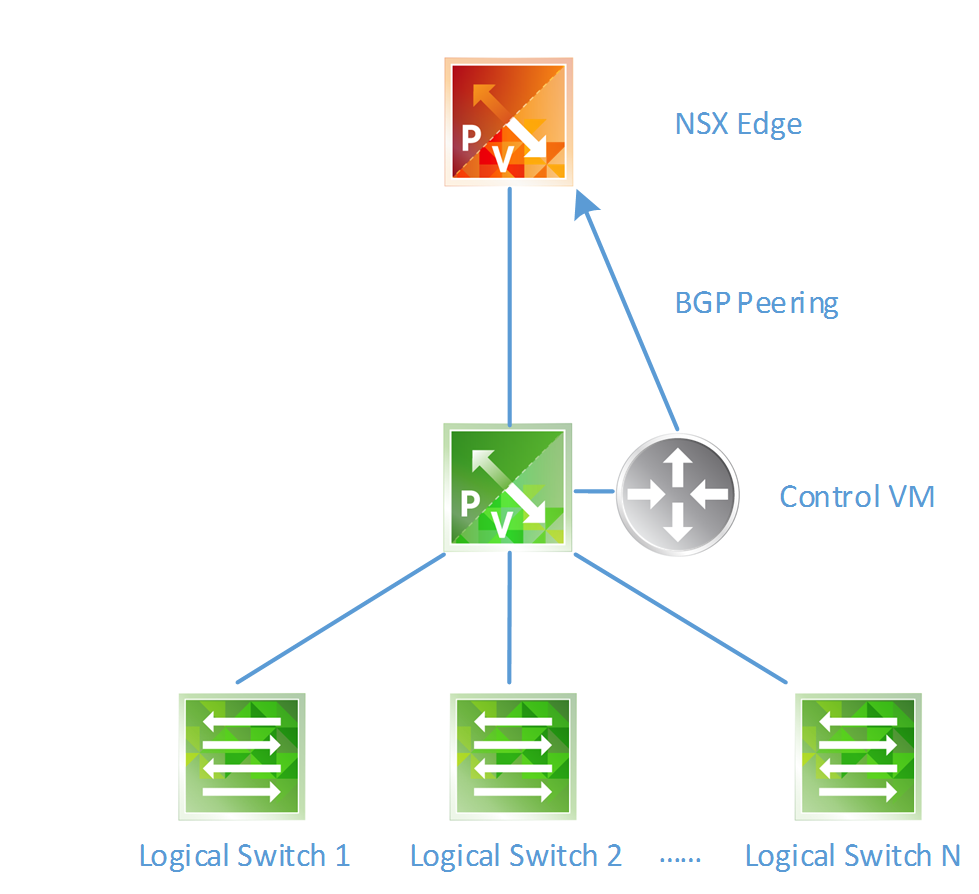
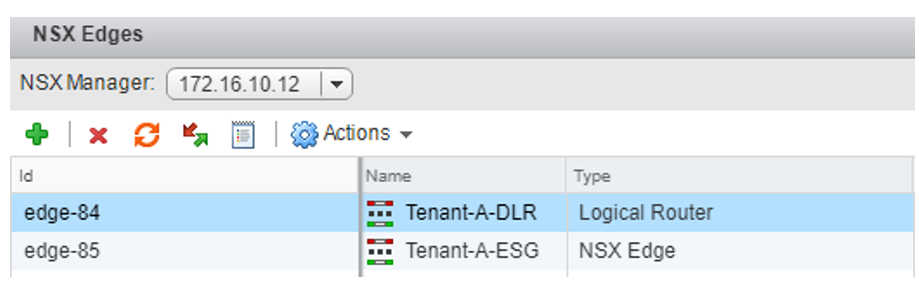
This information is used to construct the Distributed Logical Router (DLR) and Edge Services Gateway (ESG) devices via API calls:

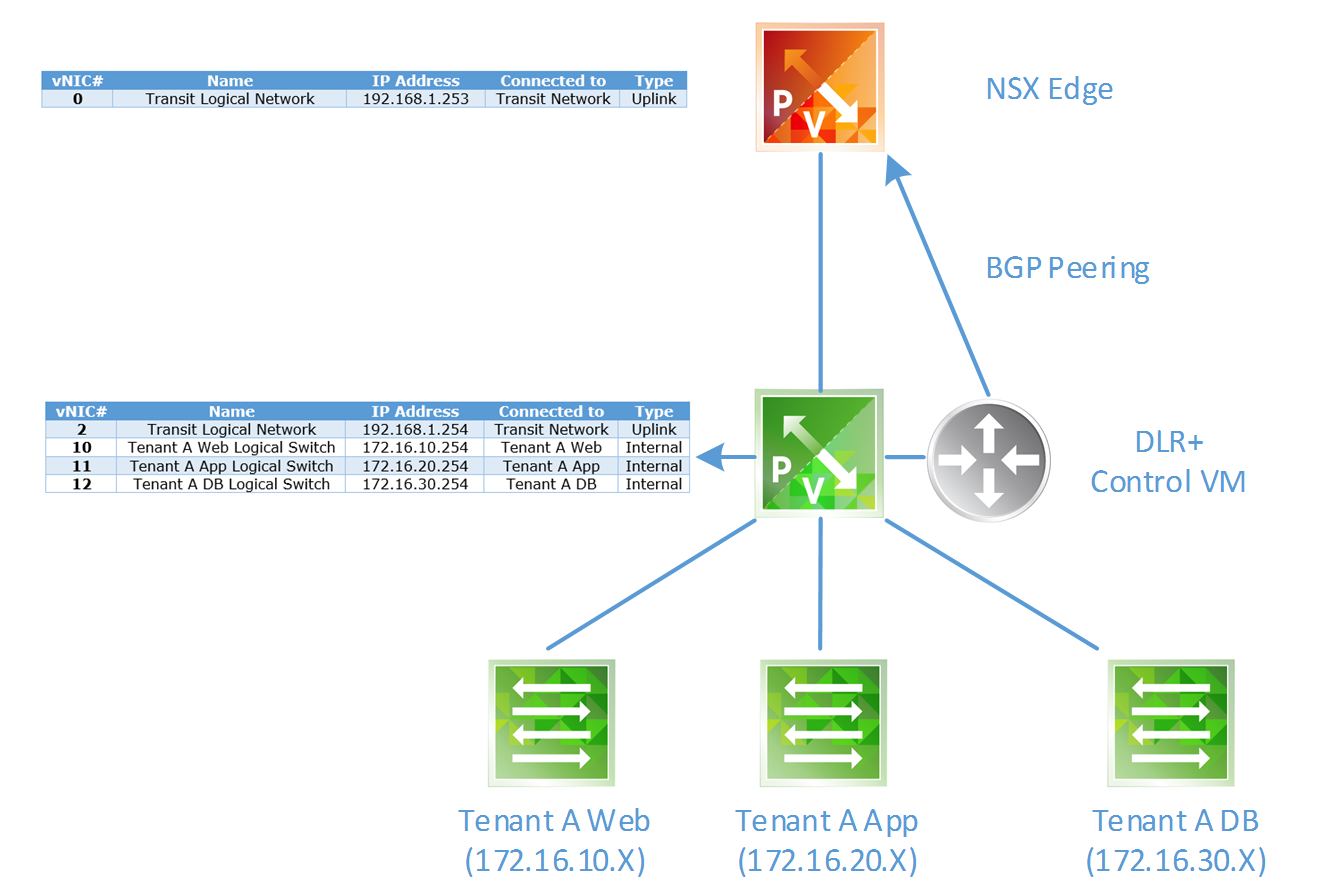
At this stage, the following has been created:


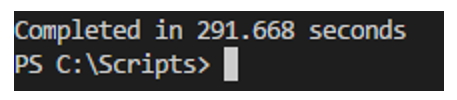
At which point the script outputs the total amount of time elapsed to construct this topology in NSX (including the time taken for the user to input the data for).

In this example it took 291.7 seconds (4.9 minutes) to construct the following:

  • Create 3 internal logical switches (for VM traffic)
  • Create 1 uplink logical switch (for BGP peering)
  • Create 1 DLR and configure interfaces on each internal logical switch (default gateway)
  • Create 1 ESG and configure interface for BGP peering
  • Configure BGP dynamic routing

Not bad at all.

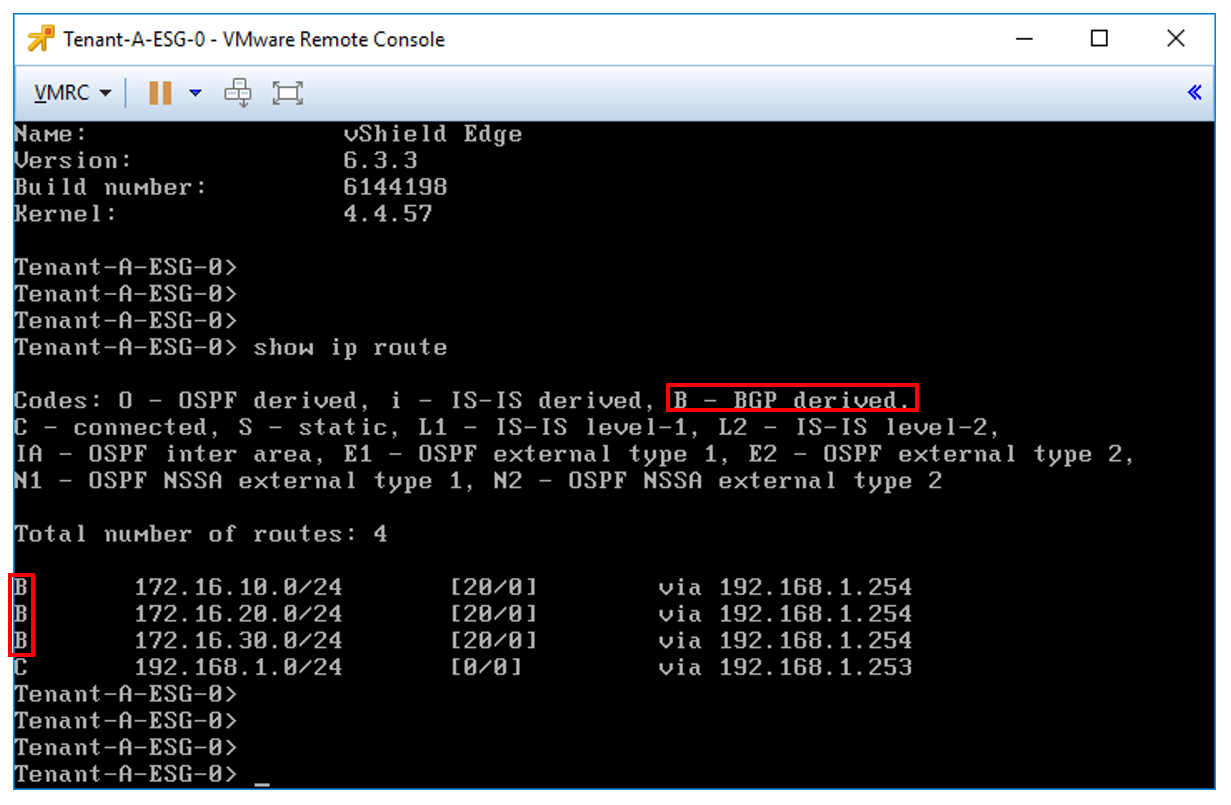
To validate the routing, we can simply log on to the ESG and check its routing table:

We can see the ESG has learnt (by BGP) the networks that reside on our DLR.

This is one of the almost endless examples of exposing and leveraging the NSX API.

For anyone interested in the Powershell script – I intend to upload the code once I’ve added some decent input validation.

© 2026 Virtual Thoughts

Theme by Anders NorenUp ↑

RSS
Twitter
Visit Us
Follow Me